
How regulatory requirements, environment, and use context collapse the solution space into a product specification.
There is a question that looks like a product decision but is actually a system definition problem. What keyboard should be used, and what does it need to become?
I encountered this during a product engagement in a regulated MedTech environment. The system was deployed in clinical settings: operating rooms, bedside stations, administrative workflows. Medical personnel used it daily under time pressure and physical constraints. I was brought in to define how input capabilities needed to expand: which workflows were underserved, which configurations were structurally inadequate, and what the system needed to become to be safe, scalable, and ready for new markets.
This was not about improving a component. It was about redefining how input works across the system.
At the start, the discussion was centered around existing configurations. Each had arguments. Each had trade-offs. The conversation was driven by preference and prior experience. I stepped out of that framing — not because those arguments were wrong, but because the decision criteria were not yet defined. Without them, any comparison was arbitrary.
I reframed the problem: what conditions define a valid input mechanism in this context?
AI was used as a supporting layer throughout. It helped aggregate regulatory references, compare patterns across similar systems, and surface edge cases early. It accelerated discovery. It did not make decisions.
Existing configurations and their capability gaps
Before defining what the system needed, the existing configurations were analyzed in terms of what interaction capabilities they actually provided.
Three configurations were in use.
The extended configuration provided full interaction capability: QWERTY input, a dedicated numeric keypad, complete directional navigation, and all control keys including Tab and Enter. It supported all workflows, including safety-critical ones, but consumed the largest amount of screen space.
The standard configuration provided QWERTY input with a numeric row and control keys. It lacked directional navigation. This made precise in-field text correction unreliable, particularly in clinical conditions where gloved hands reduce touch positioning accuracy by 40 to 60 percent.
The reduced configuration provided only basic text input with minimal controls. It excluded directional navigation and essential keys such as Tab and Enter, making it unsuitable for any structured workflow.
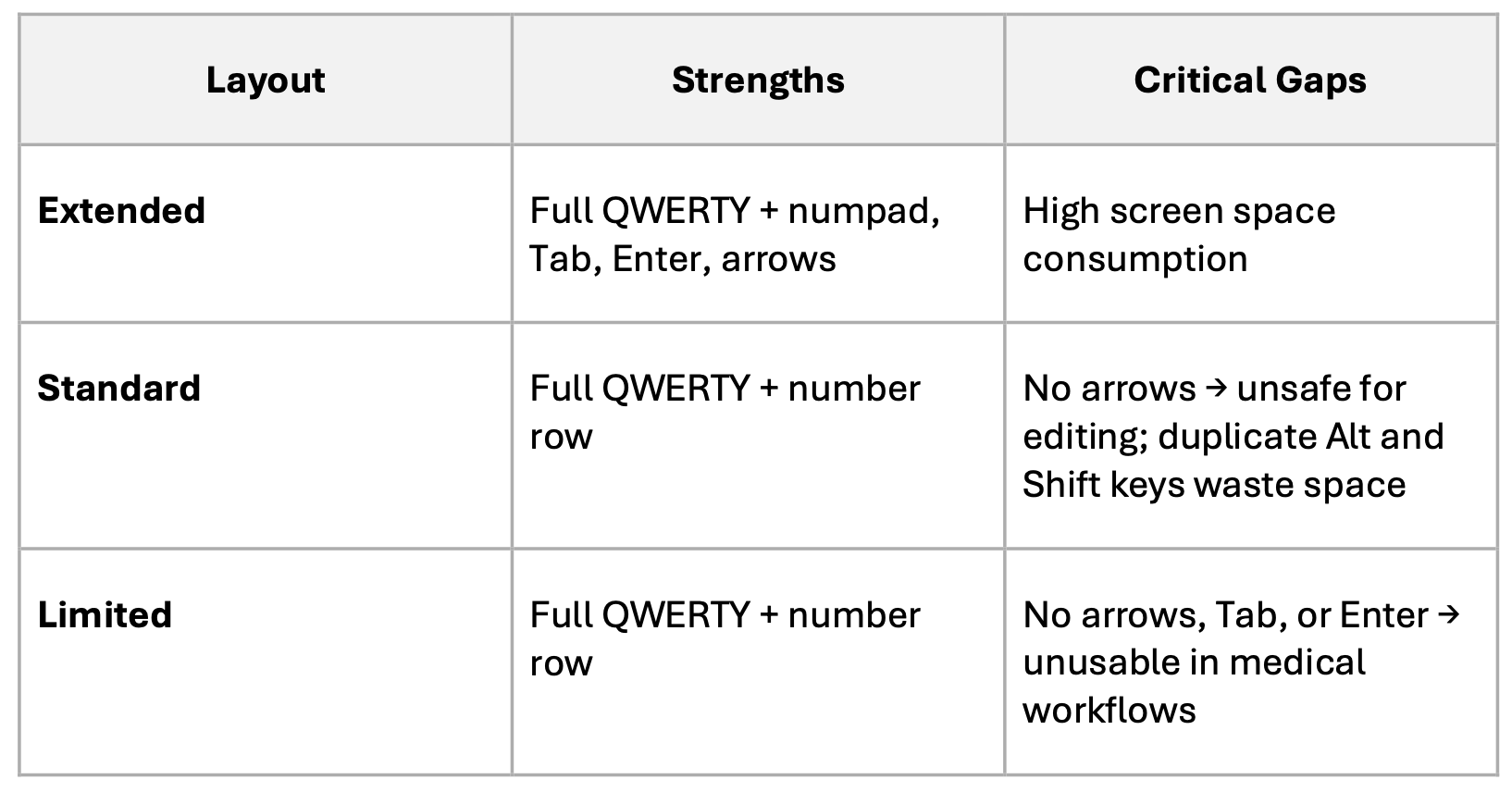
The problem was not the absence of configurations. It was the mismatch between available capabilities and real usage requirements. The standard configuration lacked the minimum capability for safe text correction. The extended configuration exceeded requirements in low-risk scenarios, consuming unnecessary screen space. The reduced configuration removed essential interaction mechanisms entirely.
These were not design preferences. They were structural gaps with traceable consequences.
What real use cases revealed
The capability gaps became concrete when mapped to actual clinical workflows. I decomposed each scenario by data type, required operations, risk level, and the failure mode produced when the wrong configuration is applied. This decomposition was the foundation for every decision that followed.
In patient demographics entry, users perform sequential input across multiple fields. Tab navigation moves between fields. Horizontal arrow keys allow correction within them. Without arrows, correcting a simple typo requires either imprecise touch repositioning or deleting and retyping the entire field. In gloved conditions, “Streey” becoming “Street” is not a three-keystroke fix. It becomes a risk.
In prescription workflows, the stakes are higher. Modifying a dosage value such as “1.5mg” to “1.0mg” requires navigating to a specific character and changing it. Without directional navigation, the entire instruction must be deleted and retyped. Under time pressure, this measurably increases error probability. Evidence from comparable systems shows dedicated numeric input reduces medication dosing errors by 15 to 20 percent. Missing navigation doubles correction time.
In clinical documentation, users perform mid-text editing across multi-paragraph content. Without reliable navigation and control keys, this becomes impractical. The reduced configuration, which lacks Enter, is unusable here. The standard configuration without arrows makes mid-sentence correction unreliable in gloved conditions.
In vital signs and numeric parameters entry, precision matters. Blood pressure, temperature, heart rate, oxygen saturation. Decimal miskeying is a documented risk. The extended configuration with a dedicated numeric keypad is appropriate. The standard configuration is acceptable but slower. The reduced configuration is insufficient.
In simple selection flows, dropdowns and checkbox lists, minimal interaction is required. A redesigned reduced configuration with Tab, Enter, and horizontal arrows preserved is sufficient.
This decomposition did not produce a recommendation. It produced the input layer for the decision model: a structured map of what each scenario requires, where existing configurations fail, and what the system must provide in each context to be safe and usable.
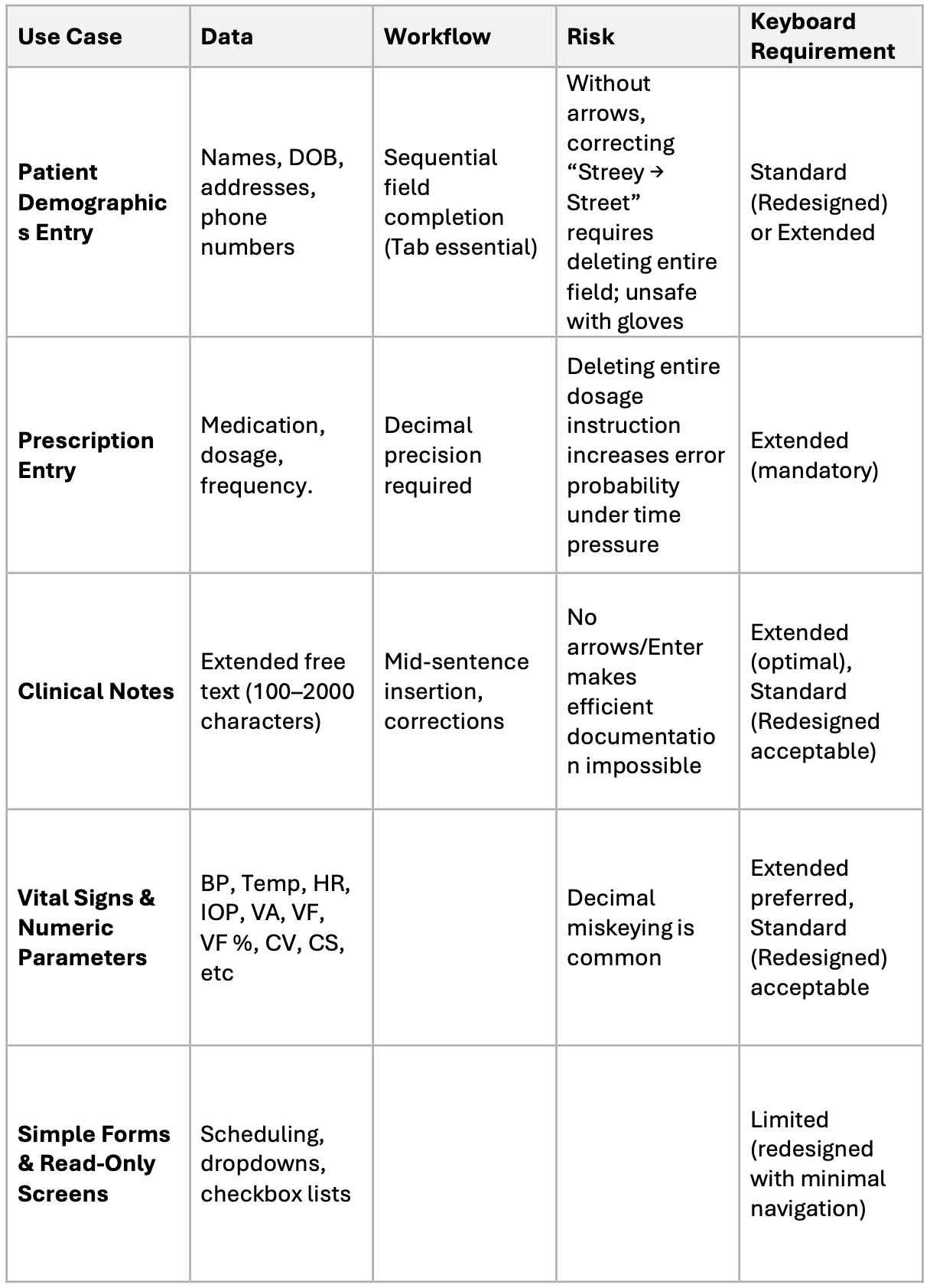
Each use case mapped to data type, workflow, risk, and keyboard requirement. The failure mode column makes the cost of each missing capability concrete and traceable.
Regulatory constraints as system boundaries
The product operates under FDA guidance, IEC 62366-1, ISO 13485, and WCAG. These were not treated as recommendations. They functioned as a filter that eliminated invalid interaction models before any evaluation of configurations began.
IEC 62366-1 classifies the keyboard selection logic as a usability-critical function. The algorithm that determines which configuration appears in which context must be validated against documented scenarios. It must be specified, not assumed.
FDA guidance requires that input fields affecting clinical outcomes either prevent incorrect input or make errors detectable and recoverable. A layout that makes correction unreliable does not meet this requirement. In a prescription entry context, a missing arrow key is a documented use-error risk.
WCAG enforces predictable navigation and consistent interaction, with explicit implications for key availability across user conditions including gloved operation and motor limitations.
AI was used to cross-reference regulatory interpretations against implementation patterns from similar regulated systems, identifying where requirements overlap, where they conflict, and where gaps in existing configurations were most likely to surface during validation.
Environmental constraints define what is achievable
Regulations define what must be true. The physical environment defines what is actually possible.
Medical personnel work in gloves. Touch accuracy drops 40 to 60 percent. Time pressure is constant. Lighting varies. In these conditions, cursor placement inside a text field becomes unreliable. If correction depends on precise touch positioning, users are forced into imprecise behavior or full re-entry.
Directional navigation is therefore not optional. It is the mechanism that makes basic text correction reliable under the actual operating conditions of the product.
Keyboard size carries its own consequence. Configurations that consume too much screen space reduce visible workspace, which increases cognitive load and affects task awareness during documentation.
AI-assisted analysis was used to model how different configurations behave under reduced precision conditions, surfacing failure points that would otherwise appear later in formal validation testing.
From context to system behavior
With the constraints established and the use cases mapped, the original question became answerable.
The system does not choose a configuration. The system derives it:
(data type x risk level x environment) → required interaction → valid configurationConfiguration becomes a consequence, not a choice.
I used this model to define three revised configurations. Each is specified not by its visual layout but by its capability contract: what interaction it enables, what it explicitly excludes, and under what conditions it is a valid component of the system.
The optimized extended configuration carries full capability across all interaction types. It is mandatory for prescription entry, clinical documentation, and numeric workflows where safety risk is high. Its scope is defined: it is the only valid configuration where an input error has direct clinical consequences.
The enhanced standard configuration is defined by a constrained capability set matched to its context. Full QWERTY, Tab, Enter, Shift, Alt, and horizontal arrow keys as a non-negotiable minimum. Vertical arrows where screen space permits. Numeric keypad excluded to preserve working area. This contract covers approximately 80 percent of medical workflows and establishes a clear upper and lower bound on what the configuration is responsible for.
The redesigned reduced configuration required a different kind of decision. The original reduced layout was not just missing keys. It had no defined scope of applicability. It existed as a fallback without a capability contract, which meant it was either applied in contexts where it failed, or excluded entirely as unusable. The architectural decision was to define what this configuration tier is actually for: establish its minimum capability floor, specify the scenario boundary within which it is valid, and make it a governed component of the system rather than an undefined residual. Tab, Enter, and horizontal arrows were added not as incremental improvements but as the minimum viable specification for that boundary to hold.
One additional requirement emerged from the market expansion objective: language switching. The language switch key is positioned at the bottom left, consistent with established iOS patterns, with lower risk of accidental activation and clear visual separation from the main typing area.
The rule system
The output of this work was not a preferred configuration. It was a rule system for context-aware behavior.
Safety-critical scenarios including prescription entry and medication administration require the extended configuration. The risk profile does not permit anything less.
Professional documentation scenarios require the extended configuration to support navigation and correction under real operating conditions.
Administrative workflows are served by the enhanced standard configuration: full capability for the task, without the spatial cost of the extended layout.
Simple selection and read-only interfaces can operate with the redesigned reduced configuration, provided Tab, Enter, and horizontal arrows are preserved.
This rule system is not a recommendation. It is a product definition artifact. It specifies the allowed behavior of the system in each context, defines which configurations are valid and which are excluded, and gives development and QA a single traceable source for implementation and validation. The work of deciding is done. What remains is building to the specification.
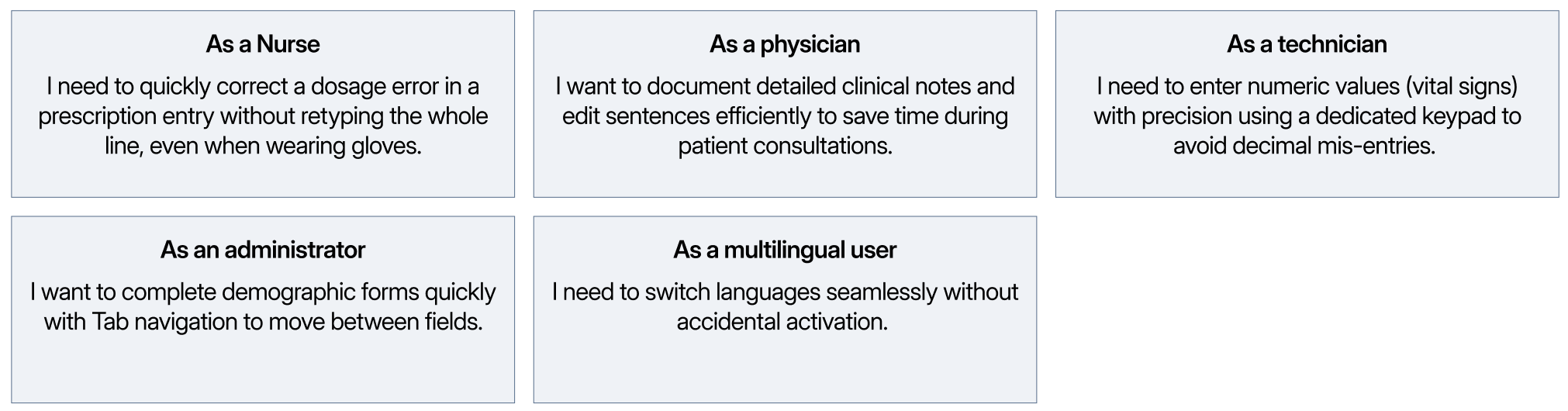
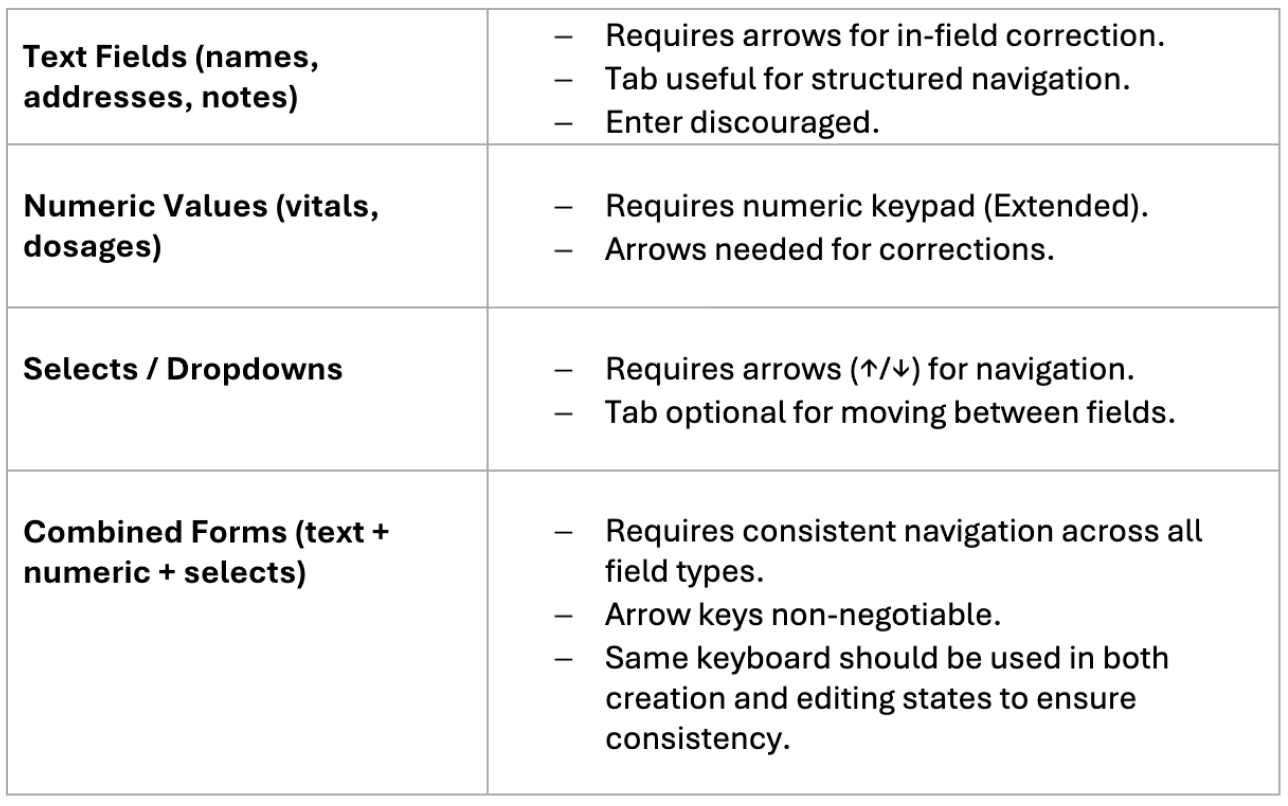
User stories across five roles and keyboard requirements across four input categories. Each maps to a specific set of capabilities, making the configuration rules concrete.
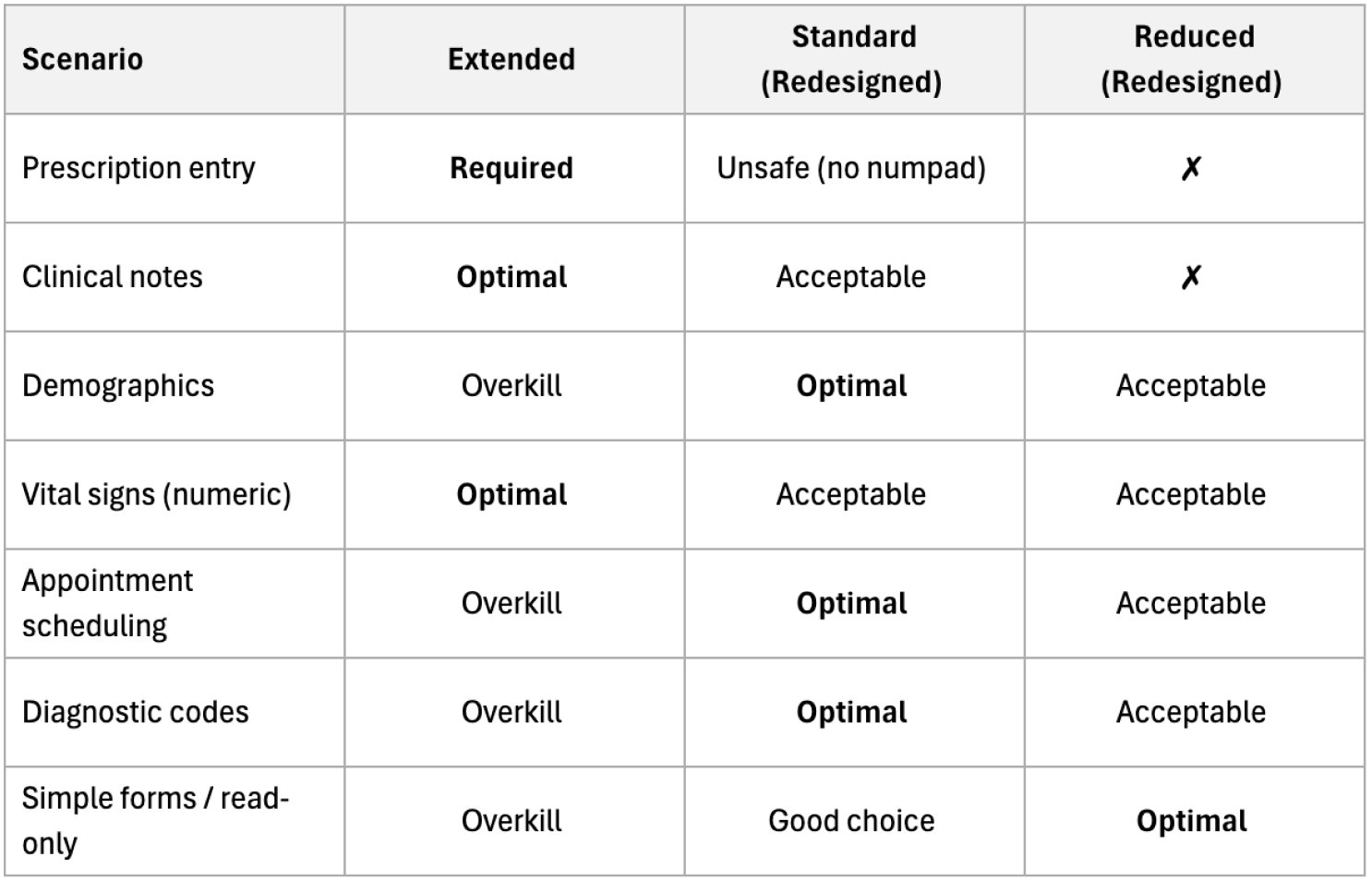
Each medical scenario mapped to the appropriate configuration. The matrix is a specification, not a preference ranking. Configuration follows from context.
What changed
Before this work, input was treated as a static component. One configuration per tier, applied uniformly regardless of task or risk. No capability contracts. No defined scope. No traceable rationale.
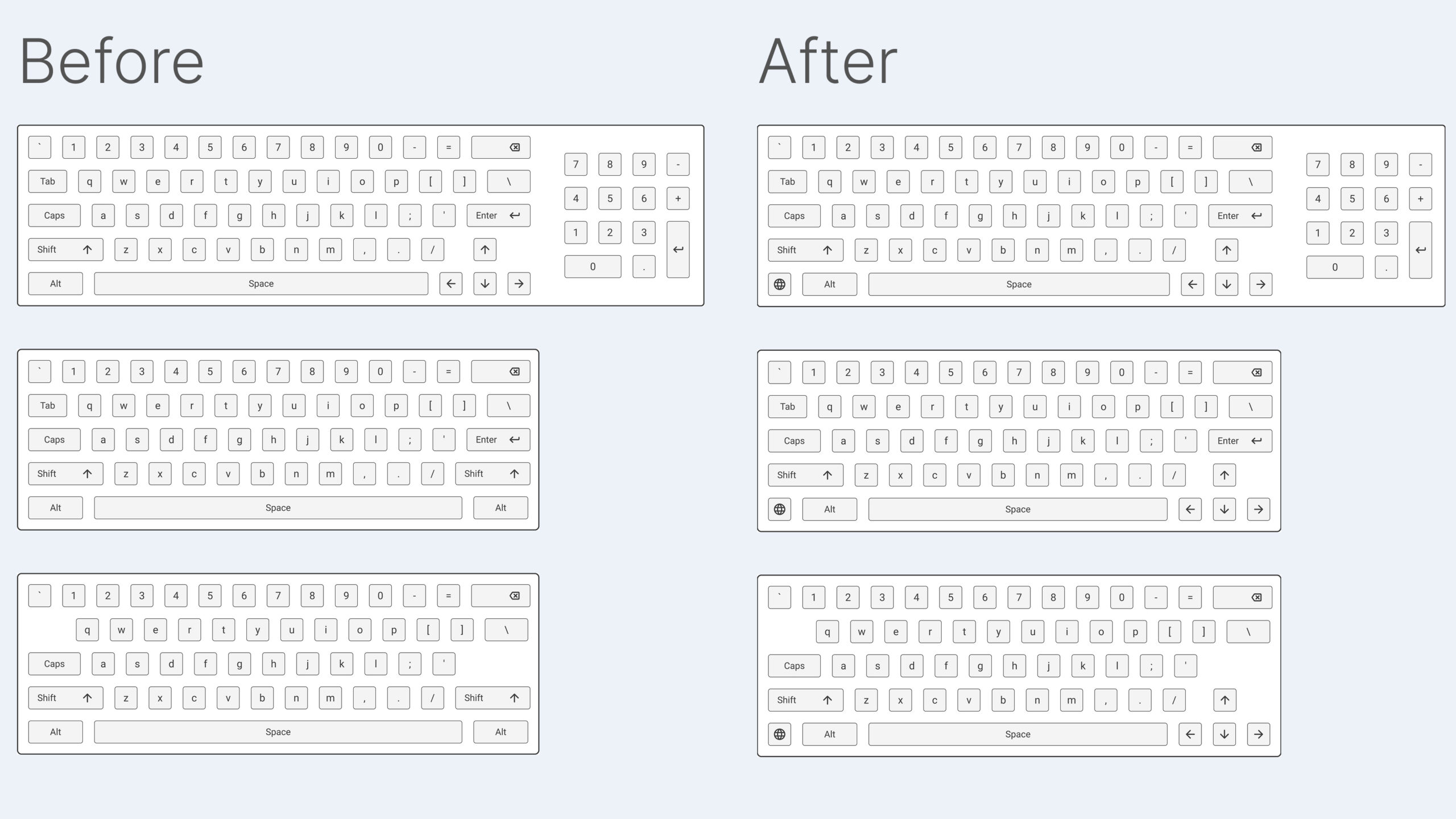
Left: existing configurations with structural capability gaps. Right: redesigned configurations with capabilities aligned to workflow requirements and risk levels.
After it, input became context-driven system behavior. The same product now operates differently depending on the risk level of the workflow, the data type being entered, and the physical conditions the user is working in. Each configuration has a defined place in the system, a defined boundary, and a documented reason for both.
The shift is not from a worse configuration to a better one. It is from undefined criteria to predictable, traceable behavior.
Final principle
When a decision feels contested, it usually means the criteria have not been established. Options get compared against each other rather than against the system they need to serve.
Those criteria exist in the system: in regulatory requirements, in the physical conditions of real use, in the specific failure modes of specific tasks. AI can accelerate the process of surfacing them and stress-test assumptions before they become product decisions.
But it does not define the system. Constraints do.
Once constraints are explicit, the solution space collapses into a limited set of valid outcomes. What looked like a preference becomes a specification. What looked like a product choice becomes a documented requirement with a traceable rationale.
That is when the work is actually done.
This article is based on research and product definition work conducted within a regulated enterprise MedTech environment. Specific client details are confidential.